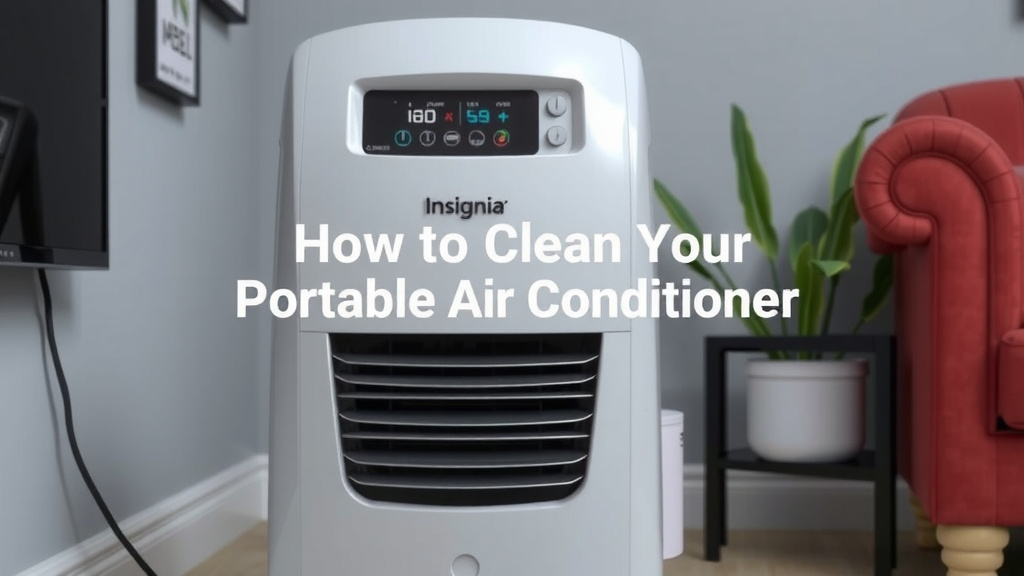
How to Clean Your Insignia Portable Air Conditioner
The easiest way to clean your Insignia portable air conditioner is by regularly cleaning the air filter and occasionally wiping down the exterior. Doing this helps maintain optimal performance and prevents dust buildup. You can usually clean the filter by simply vacuuming it or rinsing it with water.
Keeping your portable AC clean is essential for cooler air and a healthier home environment. A dirty unit can recirculate dust and allergens. Our research shows that consistent maintenance can also extend the lifespan of your appliance. It’s a simple task that makes a big difference for your comfort.
- Clean the air filter weekly.
- Vacuum or wash the filter gently.
- Wipe down the exterior with a damp cloth.
- Ensure the unit is unplugged before cleaning.
- Check the drain hose for blockages.
Let’s walk through exactly how to get your Insignia portable air conditioner sparkling clean, step by step.
Keeping Your Insignia Portable AC Running Smoothly
Your Insignia portable air conditioner is a lifesaver during hot weather. To ensure it keeps blowing cool, fresh air, a little regular cleaning goes a long way. We found that consistent maintenance can prevent dust bunnies from taking over your air supply.
Think of your AC like a trusty car. Regular oil changes and tire checks keep it running efficiently for years. Similarly, a clean air filter and a tidy exterior help your portable AC perform at its best. This guide will walk you through the simple steps to clean your Insignia unit effectively.
Your Portable AC’s Air Filter: The First Line of Defense
The air filter is the most important part to keep clean. It traps dust, pollen, and other airborne particles. A clogged filter makes your AC work harder and can reduce cooling power. Many experts suggest cleaning your filter at least once a week for optimal performance.
How to Access and Remove the Air Filter
Cleaning starts with getting to the filter. For most Insignia portable AC models, the filter is located at the back. You’ll typically find a removable grille or cover. Gently pull on the tabs or edges to detach it. Consult your specific model’s manual if you’re unsure.
Once the cover is off, you should see the filter. It might be a mesh screen or a more rigid panel. Carefully slide or lift the filter out. Be gentle; these parts can sometimes be a bit delicate.
Cleaning Methods for Your Air Filter
You have a couple of easy options for cleaning your filter. The best method often depends on how dirty it is. We recommend starting with the simplest approach first.
Vacuuming the Filter
For light dust, a quick vacuum can do wonders. Use the brush attachment on your vacuum cleaner. Gently go over the surface of the filter. This removes loose dust and debris. It’s a fast way to refresh the filter between deeper cleans.
Washing the Filter
If vacuuming isn’t enough, it’s time for a wash. You can usually rinse the filter under cool, running water. Hold it under the tap and let the water flow through the mesh. You can use a soft brush or a mild soap if the dust is stubborn. Just be sure to rinse thoroughly. Many guidelines recommend avoiding harsh chemicals, as they can damage the filter material (CDC).
After washing, you need to let the filter dry completely. Lay it flat on a towel or prop it up somewhere with good airflow. Never put a wet filter back into the unit. Moisture can lead to mold growth, which is the opposite of what you want for cleaner air.
Cleaning the Exterior and Vent Areas
While the filter is your main focus, the rest of the unit needs attention too. A clean exterior not only looks better but also helps prevent dirt from entering the unit. We found that a quick wipe-down can make a big difference.
Wiping Down the Casing
Grab a soft, damp cloth. You can use plain water or a very mild soap solution. Gently wipe down the outside of your Insignia portable AC. Pay attention to any areas that look dusty or have smudges. Avoid getting water into any vents or electrical openings. It’s like giving your appliance a quick spa treatment.
Checking and Cleaning Vents
The air vents, both where air comes in and where it goes out, can accumulate dust. Use a soft brush or a vacuum cleaner with a crevice tool. Carefully clean around the edges of the vents. This ensures unrestricted airflow, which is key for efficiency.
Some models might have larger intake vents that are easier to access. You might even be able to remove some vent covers for a more thorough clean. Again, always refer to your user manual for model-specific instructions.
Don’t Forget the Drain Hose and Water Collection
Portable air conditioners remove moisture from the air, and this water needs to go somewhere. Most units collect it in an internal tank or drain it via a hose. Ensuring this system is clear is vital to prevent leaks and maintain performance.
Inspecting the Drain Hose
If your unit uses a drain hose, check it regularly for kinks or blockages. Sometimes, dust or debris can cause a clog. You can try gently squeezing the hose to see if there’s any resistance. If it’s blocked, you might need to disconnect it (after unplugging the unit, of course) to clear the obstruction. Many sources suggest a periodic flush with water can help keep it clear.
Emptying the Water Tank
If your model has an internal water tank, you’ll need to empty it. Most units have an indicator light when the tank is full. Always unplug the AC before attempting to empty the tank. Carefully slide out the tank, empty its contents into a sink or drain, and then reinsert it securely. It’s a good habit to get into, just like taking out the trash.
A Quick Checklist for Your Cleaning Routine
To make things even easier, here’s a handy checklist to follow:
- Unplug your unit before starting any cleaning. Safety first!
- Clean the air filter at least weekly.
- Vacuum or wash the filter gently.
- Dry the filter completely before reinserting.
- Wipe down the exterior with a damp cloth.
- Check the drain hose for any kinks or clogs.
Conclusion
You’ve learned how simple it is to keep your Insignia portable air conditioner in top shape. Regularly cleaning the air filter and giving the exterior a quick wipe are the keys to efficiency. A clean unit not only cools your home better but also contributes to healthier air quality. Don’t let dust and debris hinder your comfort. Make it a habit to perform these quick maintenance tasks weekly and monthly.
Your next step? Grab a damp cloth and check that filter right now. Your AC will thank you with cooler, fresher air all season long.
Frequently Asked Questions
How often should I really clean the air filter on my Insignia portable AC?
For best performance, we recommend cleaning your Insignia portable AC’s air filter at least once a week. If you use your unit frequently or live in a dusty environment, you might need to clean it even more often. A clean filter ensures maximum airflow and efficient cooling.
Can I use soap to wash the air filter, or just water?
You can use a mild soap if the filter is particularly dirty. Just be sure to rinse it thoroughly under cool running water afterward. Harsh chemicals can damage the filter material. Always allow the filter to dry completely before putting it back in the unit.
My Insignia portable AC isn’t cooling as well. Could a dirty filter be the problem?
Yes, absolutely. A clogged air filter is one of the most common reasons for reduced cooling performance. When the filter is blocked, your AC has to work harder to pull air through it, which also uses more energy. Cleaning the filter can often restore your unit’s cooling power.
What’s the best way to clean the exterior of my portable AC without damaging it?
Use a soft, damp cloth to wipe down the exterior casing. You can use plain water or a very mild soap solution. Be careful not to let water drip into any vents or electrical components. A gentle wipe-down keeps your unit looking good and prevents dust from being drawn inside.
I’m worried about mold. How can I prevent mold growth in my Insignia portable air conditioner?
The key is to keep everything dry. Ensure the air filter is completely dry before reinstalling it after washing. Also, make sure to regularly empty the water collection tank or check the drain hose for any clogs that could cause water to back up. Proper drainage is essential for preventing mold.

![7 Best Condensate Pump For Air Conditioner [2026]](https://bathroomexplorer.com/wp-content/uploads/2026/06/7-best-condensate-pump-for-air-conditioner-2026-featured-768x432.jpg)