How to Change Levoit Air Purifier Filter Easily
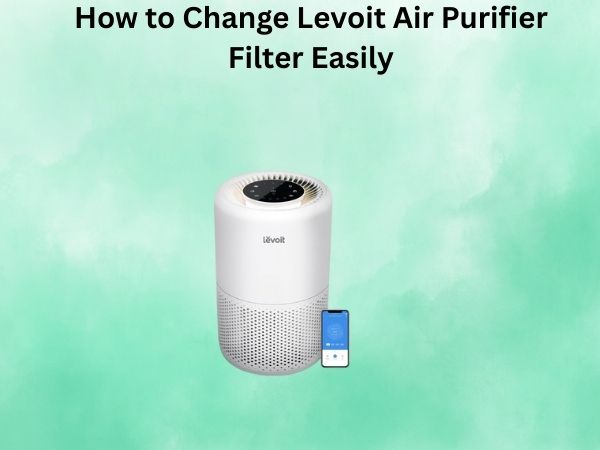
As a proud owner of a Levoit air purifier, I know firsthand how vital it is to keep it running efficiently. A crucial part of maintaining that top performance is regularly replacing the air filter. For some, the idea of tackling this can seem a bit overwhelming or complicated if you’re new to it. But don’t worry! This comprehensive guide is here to simplify the process, showing you exactly how to change your Levoit air purifier filter effortlessly, so your device continues to deliver fresh, clean air.
Understanding the Importance of Changing Your Levoit Air Purifier Filter
The air filter in your Levoit air purifier is the unsung hero of your indoor air quality. It’s responsible for trapping all those pesky airborne particles, allergens, and pollutants that can wreak havoc on your health and well-being. Over time, as the filter collects more and more of these unwanted intruders, its efficiency starts to decline. That’s why it’s crucial to change your Levoit air purifier filter at the recommended intervals, typically every 6-12 months, depending on your usage and the filter type.
Neglecting to change the filter can lead to a whole host of problems, from reduced air-cleaning performance to increased energy consumption. And let’s not forget the potential health risks – a clogged filter can’t effectively remove the harmful contaminants that can trigger asthma attacks, allergic reactions, and other respiratory issues. By staying on top of your filter maintenance, you’re not only preserving the lifespan of your Levoit air purifier but also safeguarding the air you and your loved ones breathe.
Preparing to Change Your Levoit Air Purifier Filter
Before we dive into the step-by-step process, it’s important to gather a few essential items. You’ll need your replacement Levoit air purifier filter, which you can typically purchase directly from the manufacturer or from authorized retailers. Make sure to double-check the filter model and size to ensure a perfect fit.
Additionally, you may want to have a clean, dry cloth or paper towels on hand to wipe down the interior of your air purifier, as well as a vacuum cleaner or small brush to gently clean the filter compartment.
Step-by-Step Guide to Changing Your Levoit Air Purifier Filter
1. Unplug Your Levoit Air Purifier
Safety first! Before you begin the filter-changing process, make sure to unplug your Levoit air purifier from the power source. This will ensure that you don’t accidentally turn on the unit while you’re working on it.
2. Locate the Filter Compartment
Depending on your Levoit air purifier model, the filter compartment may be located on the back, side, or top of the unit. Consult your user manual or the manufacturer’s website to identify the exact location for your specific model.
3. Remove the Old Filter
Gently pull out the old filter from the compartment. Some Levoit air purifiers may have a small tab or handle to make this process easier. If the filter is particularly dirty, you can use a vacuum cleaner or a soft brush to remove any large debris before discarding it.
4. Clean the Filter Compartment
With the old filter removed, take this opportunity to clean the interior of the filter compartment. Use a clean, dry cloth or paper towels to wipe down the surfaces, removing any dust or debris that may have accumulated.
5. Insert the New Filter
Carefully unwrap the new Levoit air purifier filter and gently insert it into the compartment, making sure it fits snugly. Some models may have specific orientation or placement requirements, so refer to your user manual for guidance.
6. Secure the Filter Compartment
Once the new filter is in place, ensure that the filter compartment is properly closed and secured. This will help maintain the air purifier’s optimal performance and prevent any air leaks.
7. Power on and Reset the Filter Indicator (if applicable)
Plug your Levoit air purifier back into the power source and turn it on. If your model has a filter indicator light or reset button, follow the manufacturer’s instructions to reset the filter change indicator, ensuring it’s ready for the next filter change cycle.
Conclusion
Changing your Levoit air purifier filter may seem like a daunting task, but with this step-by-step guide, you can now tackle it with confidence. By regularly maintaining your air purifier and swapping out the filter, you’ll keep your indoor air clean, fresh, and free of harmful contaminants. Remember, a well-cared-for Levoit air purifier is the key to a healthier, more comfortable living environment. Happy filter changing, and enjoy the pure, refreshing air that your Levoit air purifier provides!
FAQ
How often should I change my Levoit air purifier filter?
Levoit recommends changing the filter every 6-12 months, depending on your usage and the filter type. Factors like the amount of airborne particles, pets, and smoking in your home can affect the filter’s lifespan, so it’s a good idea to check the filter regularly and change it when it starts to look dirty or clogged.
Can I vacuum the Levoit air purifier filter instead of replacing it?
No, it’s not recommended to vacuum the Levoit air purifier filter. The filter is designed to be a one-time-use item, and attempting to clean it through vacuuming or other methods can damage the filter material and reduce its effectiveness. For optimal performance, it’s best to replace the filter as per the manufacturer’s recommendations.
How do I know when it’s time to change the Levoit air purifier filter?
Most Levoit air purifiers have a filter change indicator light or timer that will let you know when it’s time to replace the filter. If your model doesn’t have this feature, you can check the filter visually. When the filter starts to look significantly discolored or clogged, it’s time for a replacement.
Can I use a third-party filter in my Levoit air purifier?
While it’s possible to use a third-party filter in your Levoit air purifier, it’s generally not recommended. Levoit filters are designed specifically for their air purifiers, and using a non-Levoit filter may impact the unit’s performance, efficiency, and even void the warranty. For best results, always use genuine Levoit replacement filters.
What should I do with the old Levoit air purifier filter?
Most Levoit air purifier filters can be disposed of in your regular household trash. However, some filters may contain activated carbon or other materials that require special disposal. Check your user manual or the manufacturer’s website for specific instructions on how to properly dispose of the used filter.