How to Clean Homedics Air Purifier Filter Properly
Ensuring your air purifier runs at its best is vital for a healthy home, and as an enthusiastic user, I understand the importance of proper upkeep. The air filter, in particular, demands regular attention to maintain optimal performance. Today, I’m excited to share my comprehensive, step-by-step guide on how to effectively clean your Homedics air purifier filter. This essential routine maintenance is key to extending your unit’s lifespan and guaranteeing it consistently provides clean, fresh air for your environment.
Why Clean the Homedics Air Purifier Filter?
The air filter in your Homedics air purifier plays a crucial role in trapping airborne particles and pollutants. Over time, this filter can become clogged with dust, pet dander, pollen, and other debris, reducing the purifier’s efficiency. A dirty filter forces the machine to work harder, resulting in higher energy consumption and potentially poorer air quality. By cleaning the filter regularly, you can maximize the performance of your Homedics air purifier and ensure it continues to deliver clean, healthy air.
When to Clean the Homedics Air Purifier Filter
The frequency with which you should clean the Homedics air purifier filter will depend on a few factors, such as the air quality in your home, the number of occupants, and the presence of pets. As a general rule of thumb, you should aim to clean the filter every 2-3 months. However, if you notice a significant decrease in the purifier’s performance or an increase in noise levels, it may be time to give the filter a thorough cleaning.
How to Clean the Homedics Air Purifier Filter
Cleaning the Homedics air purifier filter is a straightforward process that you can easily do at home. Here’s a step-by-step guide:
Step 1: Unplug the Air Purifier
Before you begin, make sure to unplug the Homedics air purifier from the power source. This will ensure your safety and prevent any accidental damage to the machine.
Step 2: Remove the Filter
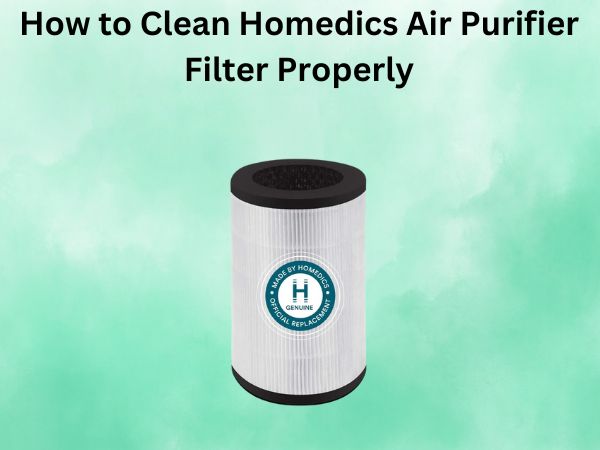
Locate the air filter compartment on your Homedics air purifier and gently remove the filter. Refer to your user manual if you’re unsure of the exact location or removal process.
Step 3: Vacuum the Filter
Use a handheld vacuum cleaner or the hose attachment on your regular vacuum to gently remove any visible dust and debris from the filter. Be careful not to apply too much pressure, as this can damage the delicate filter material.
Step 4: Rinse the Filter (Optional)
If the filter is still not as clean as you’d like, you can rinse it under running water. Gently hold the filter under a faucet and use your hands to lightly scrub the surface, being careful not to damage the material.
Step 5: Air Dry the Filter
After rinsing, allow the filter to air dry completely before reinstalling it. This can take several hours, so plan accordingly. Avoid using a hair dryer or other heat source, as this can damage the filter.
Step 6: Reinstall the Filter
Once the filter is fully dry, carefully place it back into the air purifier, ensuring it’s properly aligned and secured in place.
Step 7: Reset the Filter Indicator (If Applicable)
Some Homedics air purifiers have a filter indicator light or reset button. If your model has this feature, be sure to follow the instructions in your user manual to reset the indicator after cleaning the filter.
Conclusion
Keeping your Homedics air purifier filter clean is an essential part of maintaining the overall performance and efficiency of your machine. By following the simple steps outlined in this guide, you can ensure your air purifier continues to provide clean, fresh air for your home or office. Remember, regular filter cleaning is key to prolonging the life of your Homedics air purifier and ensuring it operates at its best.
FAQs
How often should I clean the Homedics air purifier filter?
As a general rule, you should clean the Homedics air purifier filter every 2-3 months. However, the exact frequency may vary depending on factors such as air quality, number of occupants, and presence of pets.
Can I use water to clean the Homedics air purifier filter?
Yes, you can rinse the Homedics air purifier filter under running water to remove any stubborn dirt or debris. Just be sure to allow the filter to air dry completely before reinstalling it.
What happens if I don’t clean the Homedics air purifier filter?
If you don’t clean the Homedics air purifier filter regularly, it can become clogged with dust and other particles, reducing the machine’s efficiency and performance. This can lead to higher energy consumption and potentially poorer air quality in your home or office.
Can I use a dishwasher to clean the Homedics air purifier filter?
No, it’s not recommended to use a dishwasher to clean the Homedics air purifier filter. The high heat and harsh detergents can damage the delicate filter material, so it’s best to stick to manual cleaning methods.
How do I know when the Homedics air purifier filter needs to be replaced?
Most Homedics air purifiers have a filter indicator light or reset button that will let you know when it’s time to replace the filter. If you don’t see any indicator lights, you can try cleaning the filter regularly and replacing it every 6-12 months, depending on use and air quality.