How to Clean a Fridge Water Filter the Right Way: A Complete Guide
Let me ask you something: when was the last time you actually thought about your refrigerator’s water filter? Most of us don’t give it a second thought until our ice maker starts acting up or the water tastes a bit off. But here’s the thing—your fridge water filter is working overtime every single day, trapping sediment, chlorine, and all sorts of nasty particles that you definitely don’t want in your drinking water. Think of it like the bouncer at a club: it’s constantly screening out the bad stuff so only the good stuff gets through.
The problem is, many people don’t realize that cleaning and maintaining your water filter can actually extend its life and keep your water tasting fresher for longer. I’m going to walk you through everything you need to know about cleaning your fridge water filter, from the reasons why it matters to the step-by-step process that’ll make you feel like a maintenance pro.
Understanding Your Fridge Water Filter: What It Does and Why It Matters
Your refrigerator’s water filter is basically a silent guardian in your kitchen. It’s there, tucked away usually behind a panel or at the base of your fridge, quietly removing contaminants from your water supply. Every time you fill a glass of water from your fridge dispenser or grab an ice cube, that filter has already done its job.
The Primary Functions of Your Water Filter
A quality fridge water filter removes chlorine taste and odor, which is one of the biggest reasons people prefer filtered water over tap water in the first place. It also traps sediment—those tiny particles that make water look cloudy or discolored. Beyond that, filters catch various contaminants like lead particles, certain pesticides, and other chemicals that might be lurking in your water supply.
When your filter is working at full capacity, it’s like having a personal water quality guardian. But as it works harder and harder, it accumulates all those trapped particles, and eventually, it needs some attention.
Signs Your Fridge Water Filter Needs Cleaning or Replacement
Sometimes your fridge will actually tell you when something’s wrong. Modern refrigerators often have filter indicator lights that change color—usually from green to red or yellow—when the filter is getting tired. But beyond that, there are other telltale signs you should watch for.
Water Taste and Odor Changes
This is probably the most noticeable sign. If your water suddenly tastes a bit flat, or worse, has an unpleasant taste or smell, your filter might be reaching its limit. It’s like when a coffee filter gets too clogged—the water still comes through, but it doesn’t taste quite right.
Slower Water Flow
Have you noticed the water dispensing more slowly than usual? That’s often a sign that your filter is clogged with sediment and particles. It’s working harder but accomplishing less—kind of like trying to push water through a coffee filter that’s had too many uses.
Ice Maker Issues
When your ice maker starts producing less ice or creates cubes that look cloudy or discolored, the water filter is usually the culprit. The buildup in the filter can affect the quality of the water being used to make ice.
Visible Discoloration or Cloudiness
If your water looks slightly brownish, yellowish, or cloudy, sediment has probably built up in the filter beyond its normal capacity. This is your fridge’s way of waving a red flag.
The Difference Between Cleaning and Replacing Your Filter
Here’s where things get interesting. Many people think cleaning a fridge water filter means you can just keep using the same filter indefinitely. That’s not quite how it works, and I want to be honest about this.
Can You Actually Clean a Fridge Water Filter?
The short answer is: it depends on your filter type. Most standard fridge water filters are designed to be replaced, not cleaned. The internal media—the actual material doing the filtering—can’t really be cleaned effectively because you can’t access it without destroying the filter.
However, some high-end filters do have a pre-filter stage that can collect sediment on the outside, and this can sometimes be rinsed gently. But the main filter cartridge? That’s almost always a replace-not-clean situation.
Why Replacement Is Usually the Better Option
Think about it this way: once a filter has trapped all those contaminants, they’re not just sitting there nicely—they’re clinging to the filter media, potentially growing bacteria, and definitely not coming out with a simple rinse. Replacement filters are typically inexpensive compared to the cost of potentially contaminated water.
That said, keeping the external parts of your filtration system clean is absolutely worth doing, and that’s what I’m going to show you how to do.
Tools and Materials You’ll Need Before You Start
Before you dive into any maintenance work on your fridge, gather these items so you’re prepared and won’t have to hunt around mid-project:
- Your refrigerator’s user manual (seriously, it’s your best friend)
- A soft-bristled brush or an old toothbrush
- Clean, lint-free cloths or paper towels
- Filtered water or distilled water
- A bucket or bowl for catching water
- Optional: a flashlight to see into tight spaces
- Optional: white vinegar for stubborn grime
- A replacement filter (just in case you need one)
Having everything ready before you start means you won’t get frustrated halfway through the process.
Step-by-Step Guide to Cleaning Your Fridge Water Filter System
Now let’s get into the actual process. I’m going to walk you through this like you’re a total beginner, so don’t worry if you’ve never done this before.
Step One: Locate Your Water Filter
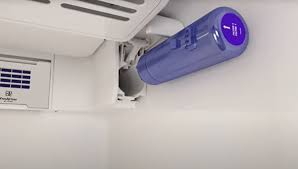
The first thing you need to do is find where your filter actually is. On many refrigerators, it’s in the top right corner of the fridge compartment, tucked behind a panel. On other models, it’s at the bottom of the fridge or even inside the base grille. Your manual will show you exactly where to look.
Once you’ve found it, take a moment to understand how it’s accessed. Some filters twist out, others slide out, and some require you to release a latch. This is information you definitely want to know before you start.
Step Two: Turn Off the Water Supply
This is really important, though people often skip it. Before you do anything with your filter, turn off the water supply to your refrigerator. You’ll usually find a shut-off valve under your sink or behind your fridge. Turning it off prevents water from leaking out when you remove the filter housing.
Step Three: Flush the System
With the water supply still off, place your bucket under the water dispenser and dispenser a cup or two of water. This empties the lines and reduces pressure in the system. It’s a small step that prevents surprises.
Step Four: Access the Filter Housing
Now comes the fun part. Remove whatever panel or cover you need to access your filter. If there’s a housing around it, you might need to loosen screws or release clips. Take your time here—you don’t want to break anything.
Step Five: Inspect the Filter and Housing
Before you do anything else, take a good look at both the filter and the housing it sits in. Are there any visible particles, discoloration, or buildup? Is there any slime or mold growth? This visual inspection tells you a lot about what’s happening in your system.
Step Six: Clean the Filter Housing
Using your soft-bristled brush and some filtered water, gently clean the housing where the filter sits. Pay special attention to the seals and grooves where bacteria and sediment like to hide. If you see stubborn grime, a little white vinegar on your brush can help, but rinse thoroughly afterward.
Step Seven: Rinse the Filter (Gently)
If your filter is removable, you can rinse it very gently under cool running water. Hold it vertical and let water run down from the top. Don’t squeeze it, don’t brush it aggressively, and don’t run hot water through it. You’re just rinsing away loose surface particles, not deep cleaning it.
Step Eight: Check the Seals and Connections
While you have the filter out, examine all the seals and connection points. Look for cracks, warping, or deterioration. These seals are what prevent leaks and ensure water flows properly. If they look damaged, that’s a sign your filter needs replacement.
Step Nine: Reinstall the Filter
Carefully put the filter back into its housing, making sure it’s seated properly. You should hear or feel a click when it’s correctly installed. Don’t force it—if it doesn’t go in smoothly, you might have it slightly misaligned.
Step Ten: Turn the Water Supply Back On
Now you can turn the water supply back on. Do this slowly and watch for any leaks at the connection points. Give it a minute to settle, then check again.
Step Eleven: Flush the New Water Through
Run your water dispenser for several seconds to flush out any particles or air bubbles that might be in the lines. Let several cups of water flow through before you actually drink any. This ensures your water tastes fresh.
How Often Should You Clean Your Water Filter?
This is where maintenance schedules come in. Most manufacturers recommend replacing your water filter every six months if you have a family of four or more. If you live alone or have a very small household, you might stretch it to nine months.
However, if you have particularly sediment-heavy water—which is common in certain regions—you might need to replace it every three to four months. Your water quality and family size are the two biggest factors here.
Does Your Water Quality Affect Filter Maintenance?
Absolutely, it does. If you live in an area with hard water—water that’s high in minerals like calcium and magnesium—your filter is going to work harder and get clogged more quickly. If your tap water comes from a well rather than a municipal source, it might have more sediment.
Getting a water quality test done on your tap water can actually tell you a lot about what your filter is dealing with. Once you know what you’re filtering, you can adjust your maintenance schedule accordingly.
Common Mistakes People Make When Cleaning Fridge Filters
I’ve seen plenty of people make these mistakes, and they’re easy to avoid if you know what to watch for.
Using Hot Water
This seems harmless, but hot water can damage the filter media and warp plastic components. Stick with cool or room temperature water.
Over-Cleaning the Filter Media
Scrubbing the filter itself aggressively can damage the internal media that actually does the filtering. A gentle rinse from the top is all you should do.
Forgetting to Turn Off the Water Supply
This can result in unexpected sprays of water and can actually damage your refrigerator’s water line system. It’s not worth the risk.
Installing the Filter Incorrectly
A filter that’s not seated properly won’t seal correctly, and unfiltered water can bypass the filter entirely. Make sure you hear that click.
Not Flushing the System Afterward
Skipping this step means any loose particles or air in the lines will end up in your glass of water. Not ideal.
When Should You Replace Rather Than Clean?
There are definite signs that cleaning just isn’t going to cut it anymore.
Filter Age and Usage
If your filter is past its recommended replacement date, it needs to go. It might still produce water, but you’re not getting the filtration quality you paid for.
Visible Damage
Cracks, dents, or warping on the filter housing or the filter itself means it’s time for a replacement. Damaged filters can leak contaminants through.
Persistent Bad Taste or Odor
If the water still tastes off after you’ve flushed the system thoroughly, your filter is at the end of its life.
Mold or Slime Growth
If you see any black spots or slime inside the filter housing, this indicates microbial growth. This is a health concern and means you need a new filter immediately.
Pro Tips for Better Filter Performance and Longevity
Beyond the basic cleaning and maintenance, there are things you can do to help your filter last longer and work better.
- Keep your refrigerator at the optimal temperature; filters work less hard with stable, cool conditions
- Don’t let your filter dry out completely; use your water dispenser regularly
- If you’re going on vacation, consider replacing the filter before you leave if it’s getting old
- Store replacement filters in a cool, dry place until you need them
- Keep notes on when you replace your filter so you remember when the next replacement is due
- If you travel between homes, each fridge might need different maintenance schedules
Understanding Different Filter Types
Not all water filters are created equal, and different refrigerators use different filter designs. Some are simple cartridges, while others have multiple stages.
Single-Stage Filters
These basic filters typically remove chlorine and sediment. They’re affordable but need more frequent replacement.
Multi-Stage Filters
Premium filters use multiple layers or cartridges, each removing different contaminants. They last longer and provide better filtration but cost more upfront.
Carbon Filters
These use activated carbon to remove chlorine taste and odor. They’re effective but can become saturated if not replaced regularly.
Your refrigerator’s manual will tell you exactly which type you have, and that determines how you should care for it.
The Environmental Impact of Water Filters
Here’s something to think about: replacing your fridge water filter regularly might seem wasteful, but it’s actually better for the environment than buying bottled water. A single-use plastic water bottle contributes to landfill waste and ocean pollution, while a water filter cartridge can be recycled or disposed of responsibly.
Some manufacturers even have filter recycling programs where you can send your old filters back to be properly processed. It’s worth checking if your filter brand offers this.
Troubleshooting Common Water Filter Problems
Even with good maintenance, sometimes things don’t work as expected. Let me help you troubleshoot.
Water Still Tastes Bad After Cleaning
First, make sure you flushed the system for several seconds after reinstalling the filter. If that doesn’t help, your filter might genuinely be at the end of