How to Drain Water From Samsung Washing Machine: A Complete Guide
Introduction to Samsung Washing Machine Drainage Issues
Have you ever opened your Samsung washing machine to find standing water sitting at the bottom? It’s one of those frustrating moments that can derail your laundry day and leave you wondering what went wrong. The truth is, drainage problems with washing machines are more common than you’d think, and the good news is that in many cases, you can handle the situation yourself without calling an expensive repair technician.
Whether you’re dealing with a completely stuck drum, a machine that won’t empty after a cycle, or you simply need to access your drain filter for cleaning, knowing how to properly drain water from your Samsung washing machine is an essential skill for any homeowner. This guide will walk you through several methods to get that water out safely and efficiently.
Understanding Your Samsung Washing Machine’s Drainage System
Before you start draining water, it helps to understand how your Samsung washing machine actually works. Think of it like learning the layout of your house before trying to fix the plumbing—you need to know where everything goes and how it connects.
How the Drainage System Works
Your Samsung washing machine has a fairly straightforward drainage system that relies on gravity and a small pump to move water out of the drum and into your home’s drainage system. When a washing cycle finishes, the drain pump activates and pushes water through the drain hose and out of your machine. The system is designed to be reliable, but blockages, clogs, or mechanical failures can interrupt this process.
Key Components You Should Know About
Your machine contains several important parts related to drainage:
- The drain pump, which actively pushes water out
- The drain filter, which catches debris and lint
- The drain hose, which carries water away from the machine
- The emergency drain plug, which provides manual drainage access
- The drum seal, which prevents water from leaking into other parts of the machine
Signs That Your Washing Machine Needs Draining
Not every situation requires manual draining, so let’s talk about when you actually need to take action. Recognizing these warning signs early can save you time and prevent water damage.
Common Indicators of Drainage Problems
- Water remaining in the drum after the cycle completes
- A burning smell coming from your machine, which could indicate a jammed pump
- Strange gurgling sounds during or after the cycle
- Your Samsung machine displaying an error code related to drainage
- Water backing up into your sink or other household drains when the washer runs
- The machine failing to spin or complete its final rinse cycle
If you’re experiencing any of these issues, it’s definitely time to take action and learn how to drain your machine properly.
Safety Precautions Before Attempting Drainage
I can’t stress this enough: safety comes first. Before you start working on your washing machine, you need to take several important precautions to protect yourself and your home.
Essential Safety Steps
First and foremost, always unplug your washing machine from the electrical outlet. Water and electricity are a dangerous combination, and you don’t want to risk electrocution while working on drainage components. Give yourself peace of mind by completely disconnecting the power.
Second, prepare your work area. You’re about to release what could be several gallons of water, so place towels, a bucket, or a shallow pan beneath where you’ll be working. This isn’t just about cleanliness—it’s about preventing water damage to your floors and surrounding areas. Old towels work great because they’re absorbent and won’t break the bank if they get soaked.
Third, let the machine cool down if it’s just finished a cycle. Hot water might still be present in the system, and you don’t want to get scalded while draining.
Finally, check that the drum isn’t spinning or in the middle of a cycle before you attempt any drainage work. Modern Samsung machines have safety locks that prevent you from opening the door during operation, but it’s still worth confirming.
Method 1: Using the Emergency Drain Plug
The easiest and most straightforward way to drain water from your Samsung washing machine is using the emergency drain plug. Most Samsung models include this feature specifically for situations like yours.
Locating the Emergency Drain Plug
The emergency drain plug is typically located at the bottom front of your washing machine, usually hidden behind a small access panel or filter cover. On some models, it’s a small plastic valve about the size of a quarter. On others, it might be a pull-out knob. Check your owner’s manual or search your specific model number online to see exactly where yours is located.
Step-by-Step Drainage Process
Start by placing your towels and bucket directly under the emergency drain location. Trust me, you want that bucket positioned correctly before you open anything. Next, carefully open the access panel by pulling it toward you or unscrewing it, depending on your model’s design. Some panels pop out easily, while others require a gentle twist or a plastic panel removal tool.
Once the panel is open, you’ll see the emergency drain plug. Before pulling it out completely, position your bucket directly underneath. The water will flow immediately once you release the plug, so timing is important. Slowly unscrew or pull the plug, allowing water to drain into your bucket. If the bucket fills up, simply pour it out and continue the process until water stops flowing.
After the water has fully drained, you can screw the plug back in or reinstall it according to your machine’s design. Replace the access panel, and you’re done with this step.
Method 2: Accessing the Drain Pump Filter
Sometimes the problem isn’t just stagnant water—it’s a clogged drain filter preventing water from draining at all. This method addresses that issue while also draining your machine.
Finding Your Drain Filter
The drain pump filter in Samsung washing machines is usually located near the emergency drain plug, behind the same access panel. It’s often a cylindrical or slightly curved component that twists out like a light bulb. This filter catches hair, lint, buttons, coins, and other debris that would otherwise clog your drainage system.
Cleaning the Filter and Draining Water
Before removing the filter, place your bucket and towels in position because water will flow out. Slowly turn the filter counterclockwise until it comes free from its housing. Have that bucket ready because water will flow out faster than you might expect. Once it’s removed, you can empty it into your bucket and drain any remaining water.
While the filter is out, rinse it thoroughly under running water to remove all the debris. Use your fingers to pick out any visible items stuck in the mesh. If the filter is particularly dirty or damaged, you might need to replace it with a new one. Many people find that cleaning the filter regularly prevents most drainage issues from occurring in the first place.
Reinstalling the Filter
Once cleaned, simply screw the filter back into its housing by turning it clockwise until it’s snug. Don’t over-tighten it, as you want to be able to remove it easily next time for cleaning.
Method 3: Manual Drain Hose Technique
If the emergency drain plug and filter aren’t draining sufficient water, or if your machine doesn’t have an easily accessible emergency drain, you might need to work with the actual drain hose.
Locating and Preparing the Drain Hose
Move your washing machine away from the wall carefully—you might need help with this, as most machines are heavy. Behind the machine, you’ll find the drain hose connected to the back. It’s usually a rubber hose, either gray or black, that connects your machine to your home’s drainage system or standpipe.
Before disconnecting anything, trace where the hose goes. Is it connected to a sink drain, a utility sink, a standpipe, or your home’s main drain line? Understanding this will help you avoid mistakes and potential damage to your plumbing.
Disconnecting and Draining
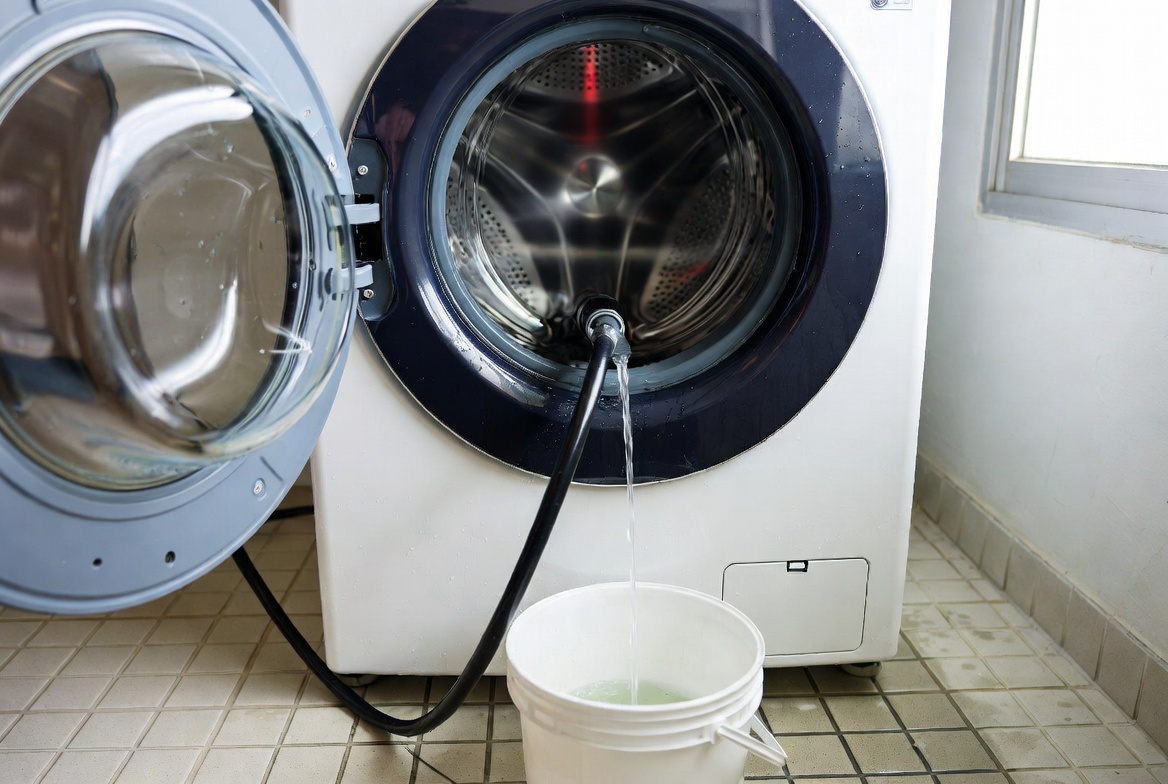
With your bucket and towels ready, loosen the clamp holding the drain hose in place. You might need a screwdriver or an adjustable wrench. Once the clamp is loose, carefully disconnect the hose and position it into your bucket or directly over a sink. The water should flow out due to gravity. If it doesn’t flow freely, there’s likely a clog in the hose itself.
To clear a clogged hose, you can blow into it gently, use a plumbing snake, or run hot water through it. Never use a rigid object that might puncture the hose. Once clear and fully drained, reconnect the hose and retighten the clamp.
Troubleshooting Common Drainage Problems
Sometimes draining your machine is just the first step. If you’re experiencing recurring drainage issues, you need to identify and fix the underlying problem.
No Water Drains at All
If you’ve tried the emergency drain and no water comes out, you likely have a significant clog. Check the drain hose connection point and see if water is backing up there. You might need to disconnect the hose and clear whatever is blocking it. Hair, lint, and small articles of clothing are common culprits. A plumbing snake can be incredibly helpful here.
Water Drains Slowly
Slow drainage usually indicates a partial clog rather than a complete blockage. The drain filter might be partially blocked with lint, or the hose might have a buildup of soap residue. Cleaning the filter thoroughly and running a drain cycle with hot water and a commercial washing machine cleaner can help resolve this issue.
Water Backs Up Into the Sink
If water from your washing machine drains into a sink and backs up, you likely have a clog in your home’s main drain line, not in the washing machine itself. This would require checking your sink trap and potentially calling a plumber. However, first make sure your washing machine’s drain hose isn’t kinked or bent, which could restrict water flow.
The Machine Won’t Complete Its Cycle
Sometimes the machine stops mid-cycle because it detects a drainage problem. Error codes can help here. Check your manual for what the specific code means. In many cases, simply draining the machine and cleaning the filter resolves the issue. If not, you might have a faulty drain pump that needs professional attention.
Preventing Future Drainage Issues
Once you’ve successfully drained your Samsung washing machine, you probably want to avoid having to do this again anytime soon. Prevention is always easier than correction.
Regular Maintenance Habits
Make it a routine to clean your drain filter every month or two. This single habit prevents most drainage problems from developing. Additionally, check your clothing pockets before washing to remove small items that could cause clogs. Use the appropriate amount of detergent—excess soap creates buildup in drain lines over time.
Running Cleaning Cycles
Many Samsung washing machines have a dedicated cleaning or maintenance cycle. Running this cycle once a month helps flush out soap residue and buildup from the system. Some people also run an empty hot water cycle with white vinegar or a commercial washing machine cleaner, which achieves similar results.
Checking Connections Regularly
Occasionally inspect the drain hose connection to make sure the clamp is tight and the hose hasn’t developed cracks. Look for any signs of water leakage. Replace the hose if you notice any damage, as it only gets worse over time.
Using a Lint Trap
Installing an inline lint trap on your washing machine’s drain hose can catch debris before it enters your home’s plumbing. This inexpensive addition can save you a lot of trouble and expense down the road.
When to Call a Professional Technician
Sometimes despite your best efforts, the problem requires professional intervention. Knowing when to throw in the towel and call a technician is important for both your safety and your wallet.
Signs You Need Professional Help
If you’ve drained the machine and cleaned the filter but water still won’t drain, you likely have a defective drain pump that needs replacement. This isn’t a job for most homeowners, as it requires disassembling significant parts of the machine. Similarly, if you notice unusual sounds when the pump is supposed to be working, the pump might be damaged and need professional replacement.
If the machine displays a persistent error code even after draining and cleaning, it might indicate an electrical issue or a sensor malfunction that only a trained technician can diagnose. Water leaking from areas other than the drain plug or filter also suggests internal damage that warrants professional attention.
Finally, if you’re uncomfortable working with the machine or don’t feel confident about any step in the process, there’s absolutely no shame in calling a professional. The cost of a service call is often worth the peace of mind and assurance that the job is done correctly.
Conclusion
Learning how to drain water from your Samsung washing machine is a valuable skill that can save you money and frustration. Whether you use the emergency drain plug, access the drain pump filter, or work with the drain hose, you now have multiple methods to handle standing water in your machine. Remember to prioritize safety by unplugging the machine, preparing your work area, and handling everything carefully.
Most drainage issues stem from simple problems like clogged filters or buildup in drain lines, and addressing these is well within the capability of most homeowners. By following the steps outlined in this guide and maintaining your machine regularly, you can prevent most drainage problems from occurring in the first place. However, don’t hesitate to call a professional if you encounter issues beyond these basic solutions. Your washing machine is an important appliance, and keeping it in good working order ensures clean clothes and smooth laundry days ahead.
Frequently Asked Questions
How often should I clean my Samsung washing machine’s drain filter?
You should clean the drain filter at least once a month, or more frequently if you have a large household or wash a lot of clothing. Some people prefer to clean it after every 10 to 15 loads, especially if they have long hair or wash items that shed lint easily. Regular cleaning prevents buildup and ensures your machine drains properly.
Is it normal for my Samsung washing machine to have a small amount of water at the bottom?
A very small amount of residual water—less than an inch—at the very bottom of the drum is normal and expected. This water remains because it sits below the drain opening. However, if you consistently see several inches of standing water after a cycle completes, that’s not normal and indicates a drainage problem that needs addressing.
Can I use bleach or vinegar to clean my drain filter?
Yes, you can soak your drain filter