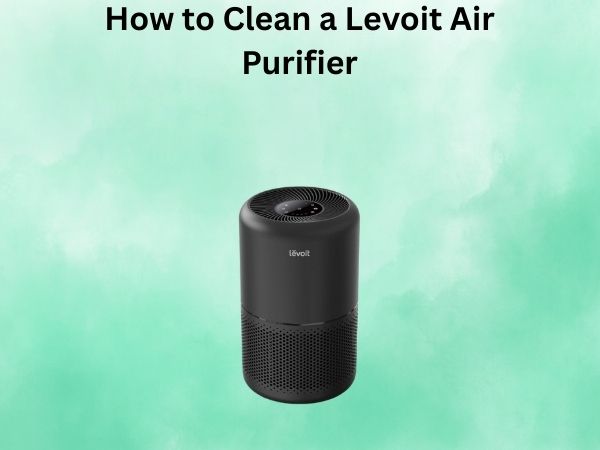
How to Clean a Levoit Air Purifier Step by Step
Congratulations on investing in a Levoit air purifier – a smart choice for maintaining clean, healthy indoor air. To ensure this essential appliance continues to deliver optimal results, a bit of regular care is crucial. Consistent cleaning and maintenance not only prolong its life but also enhance its efficiency, guaranteeing you get the full benefit of your air purification system.
In this comprehensive guide, I’ll walk you through the step-by-step process of cleaning a Levoit air purifier, from start to finish. Whether you’re new to air purifier maintenance or a seasoned pro, you’ll find all the information you need to keep your Levoit running like new. So, let’s dive in and learn how to clean a Levoit air purifier the right way!
Gather Your Cleaning Supplies
Before you begin the cleaning process, it’s important to have the right tools and materials on hand. Here’s what you’ll need:
- Soft-bristle brush or clean, dry cloth
- Mild soap or detergent
- Water
- Vacuum cleaner with hose attachment (optional)
Unplug and Disassemble the Air Purifier
The first step in cleaning your Levoit air purifier is to unplug it from the power source. This ensures your safety and prevents any electrical accidents during the cleaning process. Once the purifier is unplugged, you can proceed to disassemble it.
Depending on your Levoit model, the disassembly process may vary slightly, but generally, you’ll need to remove the front panel or cover to access the filters and other internal components. Consult your Levoit user manual for specific instructions on how to disassemble your particular model.
Clean the Filters
The filters are the heart of your Levoit air purifier, and keeping them clean is essential for optimal performance. Here’s how to clean the filters:
Pre-Filter
The pre-filter is the first line of defense against larger airborne particles, such as pet hair, dust, and lint. To clean the pre-filter, use the soft-bristle brush or a clean, dry cloth to gently remove any visible dirt or debris. Avoid using water or any cleaning solutions, as this can damage the filter.
True HEPA Filter
The True HEPA filter is responsible for capturing the smallest particles, including allergens and pollutants. To clean this filter, you’ll need to use a slightly different approach. Gently vacuum the filter using the hose attachment on your vacuum cleaner. If the filter is particularly dirty, you can also rinse it under a gentle stream of water, being careful not to submerge it completely. Allow the filter to air dry completely before reassembling the air purifier.
Activated Carbon Filter
The activated carbon filter helps to remove odors and volatile organic compounds (VOCs) from the air. Unlike the pre-filter and True HEPA filter, the carbon filter cannot be washed or vacuumed. Instead, replace this filter according to the manufacturer’s recommendations, typically every 6-12 months.
Clean the Internal Components
With the filters removed, you can now focus on cleaning the internal components of your Levoit air purifier. Use the soft-bristle brush or a clean, dry cloth to gently wipe down the interior surfaces, paying close attention to the air intake and exhaust vents. Avoid using water or any cleaning solutions, as this could damage the sensitive electronic components.
Reassemble and Test the Air Purifier
Once you’ve cleaned all the components, it’s time to reassemble the Levoit air purifier. Carefully replace the filters, ensuring they are properly aligned and secured in place. Then, reattach the front panel or cover and plug the purifier back into the power source.
Before turning on the air purifier, take a moment to visually inspect the unit and ensure all the parts are properly in place. Once you’re satisfied, power on the Levoit and check that it’s functioning correctly. Listen for any unusual noises, and verify that the airflow is strong and consistent.
Conclusion
Keeping your Levoit air purifier clean and well-maintained is essential for ensuring it operates at peak performance and continues to provide you with clean, fresh air. By following the step-by-step instructions in this guide, you can easily clean your Levoit air purifier and enjoy the benefits of a healthier indoor environment for years to come.
FAQs
How often should I clean my Levoit air purifier?
It’s recommended to clean your Levoit air purifier every 2-3 months, or more frequently if you live in a particularly dusty or polluted environment. Regular cleaning will help maintain the efficiency and longevity of your air purifier.
Can I use water to clean the filters?
You can use a gentle stream of water to clean the True HEPA filter, but avoid submerging it completely. The pre-filter should be cleaned with a soft-bristle brush or dry cloth, as water can damage it. The activated carbon filter should never be washed, as it needs to be replaced periodically.
Do I need to replace the filters regularly?
Yes, the filters in your Levoit air purifier will need to be replaced periodically, typically every 6-12 months, depending on your usage and the air quality in your home. Consult your user manual for the recommended replacement schedule for your specific Levoit model.
Can I use a vacuum cleaner to clean the filters?
Yes, you can use a vacuum cleaner with a hose attachment to gently clean the True HEPA filter. This is a great way to remove any accumulated dust or debris without damaging the filter. However, do not use a vacuum on the pre-filter or activated carbon filter.
What happens if I don’t clean my Levoit air purifier regularly?
If you neglect to clean your Levoit air purifier, the filters and internal components can become clogged with dust, pet hair, and other airborne particles. This can reduce the purifier’s efficiency, leading to poorer air quality and potentially shortening the lifespan of the unit. Regular cleaning is essential for maintaining optimal performance.